Dean & Dana HQ: Engineering a household operating system into an Android frame
November 5, 2026
Key points
- Converted an M15R4/RK3326 Android 8.1 frame into a dedicated household client while preserving its working Firefox profile and pairing.
- Built a Python/SQLite household service for calendars, shopping, named lists, reminders and animated art, then migrated persistent state to an isolated Railway service with a dedicated volume.
- Separated device capabilities: the Frame can display household data and edit lists, while calendar creation is reserved for paired phones and work-calendar data is reduced to free/busy.
- Designed encrypted migration and Cloudflare R2 recovery around schema validation, digests and overwrite refusal; successive daily encrypted backups have been observed uploading and verifying.
- Built a custom Android foreground-recovery helper with Usage Access, delayed boot/wake behavior, pause/resume, retry limits, a circuit breaker and rollback; normal restart and sleep/wake recovery have passed on the physical frame.
Most digital frames are designed to show photos and stay out of the way. I wanted this one to do more: show us what the day looked like, keep shopping and shared lists current, and turn into animated art when nobody needed it.
That became Dean & Dana HQ, a household web application running in Firefox on an aging Android frame. Getting a dashboard onto the screen was the beginning. Making it dependable meant dealing with shared state, calendar permissions, cloud hosting, backups and a device that did not always wake up where I wanted it.
One of the best moments was also one of the most ordinary. Dana created an airport-ride event from her phone. It appeared in Google Calendar, then on the frame. That was the point of the whole thing: something useful happening in our home, across the devices we actually use.
Keep the part that already works
The frame is an M15R4 built around a Rockchip RK3326, running Android 8.1 / API 27 with 1 GB of RAM. Firefox was already installed and working with the household dashboard, so I kept it.
A new WebView or third-party kiosk browser might have looked cleaner on paper. It also would have meant giving up a known-good browser profile, pairing state and rendering environment on old hardware. Earlier experiments with another kiosk application had been unreliable. Building around Firefox was the safer choice.
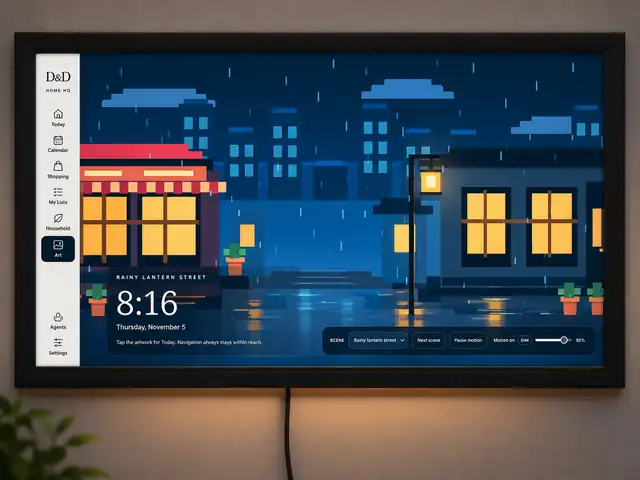
HQ remains a web application, designed for touch and the frame's limited resources. A left rail puts Today, Calendar, Shopping, shared lists, household functions and Art within reach. The Art view uses local SVG and CSS scenes: a rainy street, a lake and a cabin. They can move, pause and dim without WebGL, a continuous canvas render loop or an external image service.
Keeping Firefox does leave a visible compromise. Browser chrome can still appear. There is a user-triggered fullscreen action, but automatic toolbar-free fullscreen after every reboot is not implemented.
Build something the household can use
I started the application locally on a Windows machine. That let me work through the household workflows before adding hosting and migration to the problem.
The backend is Python with SQLite persistence. The frame and mobile interfaces share state through authenticated HTTP endpoints. Shopping supports preferred stores, quantities, checkoffs, undo and recent items. Named lists support task dates, editing, checkoffs, undo and archive/restore. Calendar views cover the daily agenda, upcoming events and a month view with drill-down.
The details mattered. An item added from one client needed to appear on another without silently overwriting a newer edit. An offline action needed to fail visibly rather than pretend it had saved. Database connections needed to close cleanly during polling. A crowded calendar cell needed a defined behavior instead of clipping information.
We tested those flows with real SQLite state and independent authenticated clients, keeping synthetic test data separate from the household's data. Browser suites covered frame and phone viewport sizes, animation and pause behavior, shared edits and offline refusal. Those tests gave us useful evidence, although a Chromium fixture is not the same environment as Firefox on the physical Android frame.
Shopping and named-list changes were also observed synchronizing across the household clients. Along with Dana's calendar event, that made the application feel useful beyond a test setup.
Give each device only the access it needs
A household calendar becomes useful quickly. It can also become over-privileged quickly.
HQ reads our personal Google Calendar data, while work availability is exposed as free/busy only. The household needs to know that a block of time is busy, not the private details of the meeting.
The frame cannot create calendar events. Paired phones have that capability, restricted by the application to the approved personal calendar path. The server enforces the device role. Hiding a button would not be enough.
That same approach runs through the rest of the application. Pairing tickets are random, single-use and short-lived, with their stored values hashed. Runtime sessions use opaque Secure, HttpOnly and SameSite cookies. Device kinds and capabilities are determined server-side, and mutations use same-origin and CSRF protections. Old development keys and unmapped sessions are rejected.
The frame is a trusted household display with a narrower role than a phone. Mobile offline storage is deliberately limited, and the service worker caches the public shell rather than private API responses. Google tokens stay on the server. The application's restrictions narrow what HQ does with those grants, even though Google's underlying scope can be broader than a hypothetical create-only permission.
These are explicit boundaries, not a promise of perfect security. A compromised cloud administrator account or trusted device remains a real risk.
Get the laptop out of the way
Once the local application was useful, the Windows computer became the obvious weakness. If it was stopped, away from home or undergoing maintenance, the household service went with it.
I considered a home Mac mini, but that would have put our home power and internet connection in the grocery-store critical path. Cloudflare Workers and D1 were another option, although they would have required adapting a working Python/SQLite application to a different runtime and storage model.
Railway was the lower-rewrite option.
The production environment is separate from my commercial projects. It runs one hq-web service with one replica, explicit CPU and memory limits, a /healthz check and a dedicated 1 GB persistent volume mounted at /data. SQLite lives on that volume rather than in the disposable container filesystem.
Moving the code was only part of the job. The original database already held household state we had created and accepted. I wanted to move that state safely, not start empty and hope nothing important was missing.
Treat migration as a recovery problem
The migration tooling uses encrypted bundles, schema validation, table and column checks, logical digests and SQLite's backup API. The importer restores into a new directory and refuses to overwrite an existing destination. Old device sessions are removed from the copy so devices can be paired fresh in the cloud.
During review, we reproduced a defect that was easy to miss: a SQLite file could pass its integrity checks while several household tables were missing. Application startup would then recreate those tables empty.
Our real database was not shown to be damaged. The validator was too permissive.
The fix was to require the full expected schema and relationships before accepting a bundle. That became one of my favorite lessons from the project: database integrity is not the same thing as application completeness.
Recovery matters after launch, too. HQ writes encrypted backups to Cloudflare R2. Railway logs have shown successive daily uploads with ciphertext verification, and the recovery key is kept separately from the hosted application. Those observations establish that the encrypted uploads were being made and verified; they are not, by themselves, evidence of a successful restore.
The transfer tooling uses established AES-GCM support from Python's cryptography library. The design work was deciding what to include, what to verify, where keys could exist and when the process should stop rather than guess.
Teach the frame how to recover
Cloud hosting removed the laptop dependency. It did not stop Android from waking up somewhere other than the paired Firefox page.
I built a small Android companion for this exact M15R4 / RK3326 / Android 8.1 target. Its job is HQ recovery, while preserving Firefox's existing profile and pairing.
The helper runs a foreground service and uses Android Usage Access as a best-effort signal of what is in front. It is not a privileged window inspector. If Firefox is already foreground, it leaves it alone. If the frame is intentionally in Settings or maintenance controls, recovery pauses.
After boot, it waits for the device to settle. After a display wake, it waits again. If it sees the known Frameo screen, it requires repeated observations before asking Android to bring Firefox forward.
It also has limits. Automatic launch attempts are rate-bounded. Repeated failure opens a circuit that requires an explicit resume, avoiding an endless foreground fight. There are PAUSE, RESUME, RECOVER and ROLLBACK paths, and the original Home state is journaled before the Home role changes.
I built the helper against API 27 with the official Android SDK toolchain and OpenJDK, without needing Android Studio on the build laptop.
On the physical frame, version v2.0.3-home reached a healthy state: the service was running, Usage Access was granted, Firefox was foreground, the recovery circuit was clear and HQ was the effective Android Home. A normal restart returned to the paired dashboard. A screen sleep/wake cycle also returned directly to HQ without re-pairing.
Those are useful acceptance results. They do not yet include a completed overnight test after disconnecting USB. The helper also cannot detect a frozen tab or an offline error page while Firefox itself remains foreground.
Make the browser do less work
Old hardware has a useful way of exposing inefficient code.
The month-calendar path was repeatedly creating timezone formatters, processing the same events and rebuilding hidden UI during unchanged polls. Caching formatters and date spans, skipping hidden-view work and avoiding unnecessary DOM replacement removed much of that work.
In a controlled Chromium fixture with 350 synthetic calendar events, one candidate reduced the median month-open action from roughly 1.3 seconds to about 10 milliseconds.
That was a code-level benchmark of the candidate, not a measured speedup on the physical frame. It excluded Android scheduling, Firefox painting, GPU work, network latency and OS memory pressure. The useful lesson was straightforward: on a resource-constrained client, removing unnecessary work can matter a great deal.
Where it stands
Dean & Dana HQ now runs in Firefox over Wi-Fi without needing the old Windows server or a USB tether for normal use. The Railway service has persistent SQLite state. Shopping and shared lists synchronize across paired clients, personal calendar data appears in HQ, and work availability stays limited to free/busy. Calendar creation is reserved for paired phones. Art mode provides local animated scenes with pause and dim controls.
The frame has passed normal restart and screen-wake recovery, and successive daily encrypted backup uploads have been observed and verified. Longer-running reliability still needs evidence, including the overnight test after USB disconnection.
There is more to build. Automatic browser-chrome-free fullscreen after restart and reliable detection of a hung or offline Firefox tab remain open. Retailer-aware shopping actions are also still design work; direct add-to-cart integrations have not shipped.
What I would carry into the next project
The most useful decision was to preserve things that already worked. Firefox had a working profile and rendering environment. SQLite fit the application. Keeping both let me spend time on the parts the household actually needed instead of rewriting the stack for fashion points.
I also came away thinking differently about kiosk mode. Boot timing, wake timing, maintenance escape hatches, retry limits and rollback mattered more than hiding a toolbar. A good recovery helper needs to know when to leave the browser alone.
Finally, a household dashboard is a small distributed system. It has multiple clients, stale state, synchronization, permissions, offline behavior, external APIs and persistent data. It also has people who expect it to work when they are trying to leave the house.
I started out wanting to make a photo frame more useful. I ended up connecting a household application, an old browser, cloud infrastructure and a recovery system into something that now lives in our home. That is what made Dean & Dana HQ interesting to build.